A product version of my hand-built external brain came out. I compared them and found nothing to add
Someone pointed me at a product called Basic Memory. Its tagline is “Real memory for your AI. A knowledge base you own.” It keeps the Markdown your AI reads and writes on your local machine, builds full-text, semantic, and graph indexes on top, and serves it all over MCP so any client can query it. The product site says 3K+ GitHub stars and 57K downloads a month. The local version is free and open source, and cloud sync starts at $15 a month.
The pitch was nearly word for word what my external brain does. Back in June I turned an Obsidian vault into Claude Code’s memory, then added semantic search, then a layer for the big picture, and wrote about it up to the point where it became three layers. All of it hand-built. If a product version was out there, I should either switch to it or at least steal something from it. So I read the top page, the docs, the GitHub README, and the README of the Claude Code plugin, and built a table mapping each feature to whatever I have on my side.
The table filled in, one to one
| Basic Memory | My external brain |
|---|---|
| Read and write Markdown through MCP tools | Read and write the vault directly. Format governed by obsidian-protocol |
| Hybrid full-text plus vector search (FastEmbed, SQLite) | vault-search. Keyword and Ollama embeddings fused with RRF, SQLite |
build_context follows [[link]]s | vault-search’s nb. Lifts notes one hop away via links and tags. The map view is the MOC |
| Session-start briefing (last 3 days) | persona.md. A hook flags it stale after 7 days and I regenerate it |
| Checkpoint before context compaction | Full-text search over raw session logs, plus a work log I write by hand |
| Shares the folder with Obsidian | The vault is the thing itself |
| Cloud sync, from your phone | Syncthing and Remote Control |
Reading and writing: they expose 21 MCP tools such as write_note and edit_note and have the AI call them. On my side Claude Code reads and writes the vault files directly, and a skill called obsidian-protocol lays down the rules for what goes where and in what shape. Different tools, same principle: Markdown is the source of truth. This one difference in tooling, though, is a difference in reach rather than in features, and it comes back exactly once later on.
Search: they layer FastEmbed vector search on top of SQLite full-text search. My vault-search is also SQLite, queries by both keyword and Ollama embeddings, and merges the rankings with RRF. As I wrote in the semantic search post, it is 300 lines of Python using nothing but the standard library.
Graph: their build_context tool follows [[link]]s to pull in surrounding notes. Mine doesn’t walk that far, but vault-search gives a small boost to notes one hop away from the top hits via links and tags. The problem of being able to find points but not see the surface was what the two-layer post solved with a MOC.
Briefing: their plugin uses a SessionStart hook to hand Claude the last three days of work and open tasks. I distill a single file called persona.md from my hand-written notes and have it read at startup, and when it gets seven days old a hook tells me it’s stale and I rebuild it. I rebuilt it yesterday, for that reason.
Checkpoints: their plugin uses a PreCompact hook to write a summary of the session as a note right before the context gets compacted. On my side, the full-text search over raw session logs I described in the third layer post quietly keeps everything, and the summary is a work log I write by hand.
Sharing with Obsidian: for them, this means that if you open the folder the AI writes to in Obsidian, you see the same files. For me the vault is the thing itself. Where the AI writes and where I open are the same folder from the start, so there is no sharing step to speak of.
Phone: they cross devices through cloud sync. I sync the vault to Android with Syncthing, and for search and writing I drive the PC session from my hand with Remote Control. That was settled in the July post.
I started reading to find something to steal. By the time the table was done, the feature column had no blanks.
The one thing they have and I don’t
There is exactly one. MCP.
vault-search is a CLI I call from Bash. Claude Code has a shell, so it reaches. Clients without a shell, like Claude Desktop or ChatGPT, can’t. In the post about not locking into one AI I wrote that the only Claude-specific piece was the reading rules. More precisely, it’s “specific to agents that have a shell.” Basic Memory serves the same Markdown over MCP, so anything that speaks MCP gets the same memory.
But right now I only use Claude Code. If a day comes when I want to query the vault from another client, wrapping vault-search in a thin MCP layer would be faster than installing Basic Memory. The index and the note format stay as they are.
What installing it would add
I also listed what would grow if I put it in. It would be the local version, so no money. What grows is something else.
One more MCP registration. When I built a tool to audit my MCP config, my environment had exactly one registration, the X integration. This would add a second, launched by package name through uvx, and the audit table would have two rows.
Twenty-one tool definitions in the session context. Seven for content, three for search, one for the graph, four for project management, three for schema validation, three for compatibility and diagnostics. My vault-search is one Bash command and adds no tool definitions.
A second index. Their default embedding model is bge-small-en-v1.5, an English model, and going multilingual means swapping the model in config. My vault is mostly Japanese, and vault-search has indexed with the multilingual bge-m3 from day one. I could swap theirs to point the same way, but the place I’d end up is where I already am.
A clash of formats. They treat each file as one entity, with facts written as - [category] content #tag lines and relations as - relation_type [[Target]] lines, which the index reads into a graph. My rules are: mark unverified claims with (guess) or (needs confirmation), date every fact, and only link notes that were actually related. Putting both in the same vault means either bending the AI-written part to one format or quarantining it in its own folder.
The direction was the opposite
While filling in the table, what caught my attention before any feature was the direction.
Their plugin hands over a briefing automatically at session start and writes a checkpoint automatically before compaction. The design keeps memory from being lost by increasing how much the AI quietly writes.
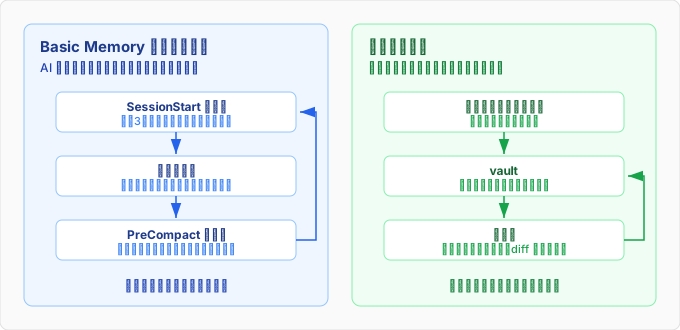
Mine goes the other way: I write by hand, and I maintain what I wrote by hand. Yesterday I ran that maintenance for the first time in a while, and the map of my own environment had four stale entries. The version-control path of a skill had changed but the note still said the old one, four recently created repositories were missing from the repo list, the list of public repos didn’t match the table in the same note, and a link pointed at a note that doesn’t exist. Checking against the actual machine turned up one more: something the note called a symlink had become a copy. A single page I wrote in June and hadn’t touched for three months had drifted that far from reality.
The trouble with an external brain isn’t having too little memory. It’s memory that should be there having rotted. Even a hand-written page drifts in four places in three months. The speed at which I can maintain notes doesn’t go up when the writing side is automated. If only the writing is automated, what grows alongside is notes that rot with no one looking at them. So my time goes into the procedure for finding rot and fixing it, rather than into tools that write more. Basic Memory and I are solving different problems.
Not installing it
The table filled in, the only thing they have that I don’t is MCP, and what I’d gain is a registration, tool definitions, an index, and a format clash. Before any of that, they are solving the problem of memory getting lost, and the problem I have is memory rotting. I’m not installing it. The one condition for reconsidering is wanting to query the vault from a client other than Claude Code, and even then the first thing I’d try is wrapping vault-search in MCP.
When I heard a product version was out, my first thought was: they beat me to it. Once the table was filled in, what they had beaten me to was features, and features weren’t what I was struggling with. The next thing to work on is a procedure that finds the page that drifted in four places over three months, sooner.
comments powered by Disqus