I audited my own MCP config. The only thing it flagged was the X integration I had installed myself
After building a tool that audits the listening ports of local AI services, I started thinking about what to build next, and looked at what is trending. Skimming GitHub trending and the recent news, it comes down to three things: agent frameworks themselves, bundles of Claude Code skills and hooks, and security for MCP and agents. The first two already have plenty of lookalikes, so an individual’s version sinks without a trace. In the third, there were static scanners for agent code, tools that actively probe an MCP server, and enterprise SaaS. Something that shows “how the MCP servers registered on my machine are exposed right now” was not something I could find.
The previous tool connects to default ports and judges from there. It never reads a config file. MCP is the opposite: where things are registered is written only in config files. So this one starts by reading them. It is called mcp-exposure, a Go CLI with no dependencies. Run it with no arguments and it prints one block per registered server, like this.
$ mcp-exposure
xapi  claude-code/user  stdio  WARN
  npx -y @xdevplatform/xurl mcp https://api.x.com/mcp
  UNPINNED         @xdevplatform/xurl is fetched at every start with no exact version
  SECRET_INLINE    env.CLIENT_SECRET is stored in plaintext
The last word on the first line is the verdict: ok, WARN or RED. In this post I call them green, yellow and red. My machine had exactly one MCP server registered. That one came up yellow on two counts. The tool reads the configs of five clients, but the only one I could run it against for real is this Claude Code entry; for the others I confirmed the file format from the docs and made sure they parse.
The spec only protects HTTP
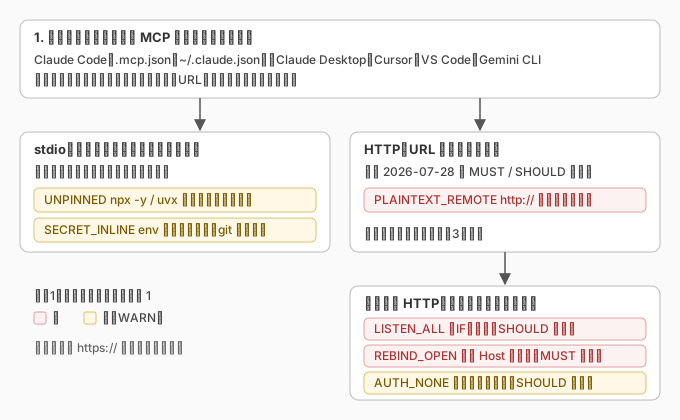
MCP registrations live in different places for Claude Code, Claude Desktop, Cursor, VS Code and Gemini CLI. All of them are JSON, and each server has either a command with arguments or a URL. The first is stdio: the client starts a child process and talks to it over standard input and output. The second is HTTP: the client connects to a server listening somewhere. The tool branches on that.
For HTTP, the MCP specification (version 2026-07-28) spells out obligations on the server side. It MUST validate the Origin header, as a defense against DNS rebinding. When running locally it SHOULD bind only to 127.0.0.1, not 0.0.0.0. It SHOULD implement authentication for all connections. The three checks I ran against Ollama in the previous post map straight onto the spec’s wording.
So when a URL points at loopback, the tool goes in the same way the previous one did. Connect on every local address to see where the socket is bound. Compare a plain request with one carrying evil.example in both Host and Origin to see whether Origin is validated. A plain request that gets a 2xx means no auth. A URL with http:// pointing at a host that is not this machine gets a PLAINTEXT_REMOTE red without connecting at all: headers and body travel in the clear. A plaintext secret in headers is picked up by the same check as a plaintext secret in stdio’s env.
For stdio there is no equivalent protection in the spec. Naturally so: starting a child process is not MCP’s business, it is the client config file’s business. What the tool looks at there is two things. Whether the server is started by package name through something like npx -y or uvx without a pinned version (UNPINNED). Whether a value in env is plaintext under a secret-looking key (SECRET_INLINE). Neither is a spec violation. They are questions about how you registered it, in a place where the spec says nothing.
My own X integration
The flagged xapi is the one I installed in July when I set up X’s MCP with OAuth. It starts X’s own @xdevplatform/xurl package through npx -y, with CLIENT_ID and CLIENT_SECRET in env. The docs at the time said to write it that way, so I did.
npx -y package asks the registry, at every start, for the current version of that package. What runs on my machine is decided by the registry, not by me. It is an official package, so the odds of it being swapped out are low. That is why it is yellow rather than red. The reason it is not simply dropped is that the point is not the odds but who is deciding.
To decide whether to pin it, I looked at the npm release history. First release February 20, 2026; latest 1.3.1 on July 21; ten versions in seven months. But there were only four days with a release: four versions in February, three at the end of June, three in July. Releases come in bursts. When I installed it in early July, the latest was 1.2.2. Since then npx -y had quietly swapped in 1.2.3, 1.3.0 and 1.3.1, three times. It kept working, so I never noticed.
At that cadence, pinning costs me a few automatic updates a year, and there is little risk of the situation from the previous post, where an updated Ollama sat on disk while the old one kept running for months. I changed it to @xdevplatform/xurl@1.3.1. The next time this package changes on my machine, the registry will not be the one deciding. I will.
The plaintext secret lives in ~/.claude.json, which is not in git. The tool sees that and stops at yellow. The same value in a git-tracked file would be red. Plaintext is still plaintext, and every process that can read this file can read it. But it sits in the same kind of place as ~/.aws/credentials, and calling that red felt like overstating it.
Deciding what not to flag was harder than flagging
In the previous post I wrote about the macOS AirPlay receiver coming up red every time. One false positive and the exit code is always 1, which means the tool cannot go in cron. An audit tool’s value is not how many reds it prints but whether you can trust them. This time I had a review agent read both the design and the implementation before running anything, to kill false positives up front. Here is what got killed.
I was treating @latest as pinned. In npx -y pkg@latest there are characters after the @, so the first implementation saw “version specified”. But latest is a moving name that points somewhere new at every start, and so is a range like ^1.2.0. Only a three-number version counts as a pin now.
I was treating AUTHOR as a secret. The rule was “if the key contains auth”, a substring match, so AUTHOR, OAUTH_MODE and KEYBOARD all matched. Now the key is split into words at underscores and case boundaries, and only whole words like key, secret or token count. GOOGLE_APPLICATION_CREDENTIALS matches by name, but if its value is a path under /Users/... it is the location of a secret, not the secret, so it is skipped.
In uvx --python 3.12 mcp-server-git==1.0.4, I was reading 3.12 as the package name. The parser did not skip the argument after a value-taking flag, so a properly pinned entry got a nonsensical yellow saying “3.12 is unpinned”. Each launcher now carries a list of the flags that take a value.
I was treating ${env:VAR} as plaintext. Variable references are written differently per client: Claude Code uses ${VAR} and ${VAR:-default}, Cursor uses ${env:VAR}, and VS Code also has ${input:name} for prompted values. The first check only recognized the ${VAR} shape, so on every other client every reference would have been yellow. Now anything with ${, or $ followed by a name, counts as a reference. For this check a miss costs less than a false alarm, so I leaned loose.
None of this was visible when I wrote the code. My environment has only xapi, so running it myself turns up nothing. The only way to catch these was to imagine other people’s config shapes, and the fastest way to do that was to hand it to a reviewer.
What I decided not to read
Codex CLI’s config is TOML, and the standard library has no parser for it, so the first version does not read it. Neither does it read the MCP servers that Claude Code plugins bring along, because that needs a way to tell which plugins are enabled. It does not query any package registry: whether a package exists, or is a known bad one, is not checked. It sends nothing to remote https:// servers. For those the output shows the transport and the host, nothing else. It does not look at the host firewall, same as the previous tool: a socket bound to all interfaces is not proof that a neighbor can reach it.
Three times, it was something on my own machine
Two posts ago, I read about a vulnerability and looked at my own Ollama, and found an old version still running after an update. In the previous post, I turned the local AI check into a tool and the first red was AirPlay, not local AI at all. This time, I turned the MCP check into a tool and it flagged the entry I had added to post to X.
All three times, the thing that came up was not somebody else’s server. It was something I had installed, or something I had let run on my machine without a second look, and I had stopped looking the moment it worked. On install day, the only question I ask is whether it runs. The day I ask how it is exposed never comes on its own.
go install github.com/nobu666/mcp-exposure@latestNow that it is pinned, UNPINNED is gone from the xapi block. That it had been silently swapped three times is something I did not know until I ran the table. Instead of looking once on install day and forgetting, the table does the reminding, long after I have forgotten. That, it turns out, is what I wanted after writing the previous two posts.
comments powered by Disqus