I turned the lsof check into a tool. The first thing it flagged red was AirPlay, not Ollama
The previous post ended by saying that not many people have run lsof even once to see what is listening on which address. What that check actually turned up was not the vulnerability I was looking for, but an old Ollama that had kept running after an update. And the person who wrote that post had not run the check against anything other than Ollama. If you keep LM Studio or llama.cpp running, doing the same check means looking up each product’s port, running lsof, and sending a forged header with curl, once per product. I had done it once and called it a day.
I happened to be thinking about what to build next, so I turned that procedure into a tool. It is called localai-audit, a Go CLI with nothing but the standard library. No dependencies, and no lsof. Run it with no arguments and it walks the default ports of local AI services and prints a table like this.
$ localai-audit
PORT   SERVICE                      LISTEN     REBIND   AUTH      VERDICT
5000   text-generation-webui        ALL        n/a      required  RED
11434  Ollama                       loopback   blocked  none      ok
Ollama, the one I was after, is fine. The red row on port 5000 comes later.
What it looks at, and what turns red
The check in the previous post boiled down to two questions. Is the listening address loopback? Does a request with the attacker’s domain in Host and Origin get rejected? For the tool I added a third, whether there is any authentication, and made them three columns.
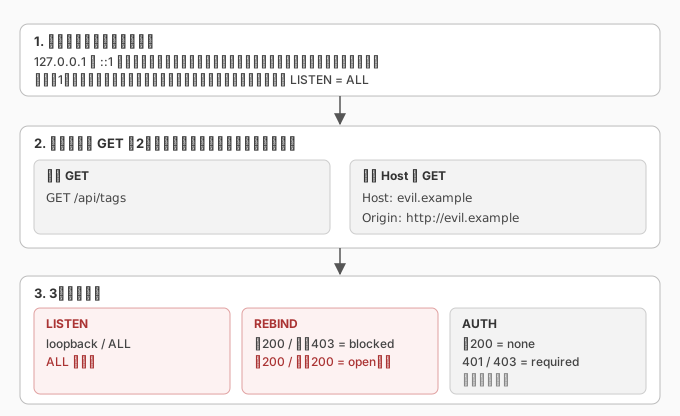
LISTEN tries to connect to the same port on 127.0.0.1, ::1, and every address the machine has on its interfaces. If anything other than loopback connects, it shows ALL. A socket bound to 0.0.0.0 accepts connections on your own LAN address too, so you can find out by connecting, without looking up the process with lsof.
REBIND (can it reject a request that arrives through DNS rebinding) sends a plain GET and a GET with Host: evil.example and Origin: http://evil.example to the same path, and looks at the difference. Plain 200 and forged 4xx means blocked. If the forged one also gets through with 2xx or 3xx, it is open. If the plain GET is not 200 there is no difference to take, so it is n/a. Redirects are not followed. This is the same request I typed into curl last time, written by a machine instead.
AUTH is none if the plain GET returns 200, and required on 401 or 403. Local LLM APIs normally have no auth, so this column alone never changes the color.
The red condition, in the first draft of the design, was “ALL and open together”. That got shot down when I handed the design to a review agent before writing any code. The attack path from the previous post arrives from a browser at 127.0.0.1. Even with no LAN exposure, if a forged Host gets through, opening one web page is enough to reach it. And the other way round: even with the Host check working, a socket on 0.0.0.0 is reachable by a neighbor on the LAN. They are two separate paths, and unless either one alone turns red, a setup with only one of them open passes as ok. After that review, ALL alone is red and open alone is red. If any row is red, the exit code is 1.
There is one thing I deliberately left out. Last time I used the unauthenticated /api/create to build a model and check whether an injection would reach the embeddings. The tool does not do that. It sends GETs and nothing else. It creates nothing and rewrites nothing. An inspection tool has no business carrying an attack procedure.
Running it on my machine
The table above is the first thing it printed. The Ollama row matches what I checked by hand last time: loopback, forged Host rejected, no auth.
The problem was port 5000. It is in the candidate list because it is the default API port for text-generation-webui, but I do not have text-generation-webui installed. The tool does not go as far as process names, so I ran lsof myself. The listener was ControlCenter. That is the AirPlay receiver on macOS, and it listens on *:5000, every interface. It answers a plain GET with 403, so it counts as authenticated and the Host check is undecidable. LISTEN is still ALL, so the row is red.
Call it a false positive. I wrote it up under known issues in the README. But the verdict itself is not wrong. There was a service bound to every interface, answering plain GETs with 403, running on my machine with nothing to do with AI. I was looking for holes in local LLMs, and the first thing the tool found was not one. When I was typing lsof -iTCP:11434 by hand, nothing other than 11434 was in view. Let a machine walk the port list and things you were not looking for come up first.
Next I reproduced the dangerous setup from the previous post. Leaving the resident Ollama alone, I started a second one on another port with OLLAMA_HOST=0.0.0.0:11435.
11435 (unknown) ALL open none REDALL and open. The line from the previous post, “bind to anything other than loopback and the Host check is skipped”, shows up straight in the table. The service name is unknown because the tool identifies services only by default port number, and 11435 is nobody’s default.
The other thing I tried was binding only to the LAN address. Start it with OLLAMA_HOST=192.168.2.199:11436 and nothing is open on 127.0.0.1. The first design started only from ports open on 127.0.0.1, so this setup would not have appeared in the table at all, and the exit code would have been 0, “no problems”. The most exposed configuration does not even make it into the table. The same review caught this one too, and the connection attempts now start from every address rather than from loopback.
The defaults point in opposite directions
To give the tool its table of default ports, I went through the official docs and source of 15 products. I only meant to confirm port numbers, but where the source stated the default bind address, I read that too. I did not manage to confirm all of them, but even the ones I could see split cleanly in two.
Loopback by default: Ollama, Jan, ComfyUI, Jupyter. Jan’s docs describe 127.0.0.1 as reachable only from your own computer and the most secure option for personal use, and make it the default. ComfyUI stays on 127.0.0.1 unless you pass --listen, and --listen with no value means both 0.0.0.0 and ::.
All interfaces by default: KoboldCpp, LocalAI, Qdrant. The help text for KoboldCpp’s --host says that if the flag is not set, all routable interfaces are accepted. LocalAI’s default address is :8080, with an empty host part, which means every interface. LocalAI does have a setting that refuses to start if you try to listen on a public address without authentication, and its description says loopback and LAN ranges are accepted regardless. The line is drawn at “LAN is not public”. That line does not match the tool. The tool turns red on anything open to the LAN. I put myself on the side that does not trust the LAN.
Last time I wrote that what protected me was not me, it was the default. That was true for Ollama. The product next door has its default pointing the other way. If you lump local LLMs together as “runs on my machine, so it’s safe”, then depending on which one you installed, it has been open to the LAN since day one. The docs say so, but reading the default bind address before installing is not the order anyone does things in. Asking the socket is faster.
What it does not see
It does not see the host firewall. A connection to your own LAN address goes through the loopback route, so the macOS application firewall and ufw on Linux never get a say. Even with LISTEN at ALL, if the firewall drops inbound connections, a neighbor cannot reach it. ALL in the table says only that the socket is bound to every interface.
Service identification is by default port number and nothing else. Port 8080 is the default for llama.cpp, LocalAI, Open WebUI, and Weaviate, so the tool lists all of them as candidates. It does not settle the question from the response body. Since a wrong guess does not change the three verdicts, I let that go for the first version.
And the only local AI service actually running on my machine is Ollama. The rows for the other products are there because I confirmed their default ports and probe paths in source. I have not run the tool against the real thing. As with port 5000, there are things you only find out on a machine where the product is actually installed.
Instead of running it once
The previous post ended with the line about how few people have run lsof even once. Running it once is easy. Looking up the port for each product and writing forged headers into curl is the kind of work you stop doing the second time. I did it once for Ollama and stopped there.
What became clear once it was a tool: the browser path and the LAN path are separate holes, and a setup with only one of them closed is still red. And since the defaults point in opposite directions from one product to the next, having been protected by one product’s default is not an experience you can carry over to the next one. The default that protected me last time did so because I happened to have picked Ollama.
The first red was not a local LLM. It was AirPlay. As long as I had the check pointed at Ollama, port 5000 was outside the frame. Last time the thing that turned up was an old Ollama. This time it was not even local AI. Every time I widen the range, something other than what I was looking for comes up first.
go install github.com/nobu666/localai-audit@latestIf you install it, run it once. Even if the row you care about says ok, there may be something above or below it that you do not remember installing. In my case, that was AirPlay.
comments powered by Disqus