My phone's external brain was a dead end — until I found the loophole called Remote Control
For a while now, I’ve been syncing my Obsidian vault between my Mac and Android phone with Syncthing. It’s an OSS tool that copies files directly between devices on the same Wi-Fi network, no cloud in between. Thanks to that, the external brain’s vault has already been sitting on my phone for a while.
Right after publishing my previous post, a question popped into my head. If everything’s synced that thoroughly, couldn’t I use the external brain from the Claude app on my phone too?
The data is already on the phone. So why had I been assuming all along that it just wasn’t possible?
Synced, but no legs to walk over there
When I looked into it again, the problem wasn’t where the data lived. It was how to reach it.
The Claude.ai phone app has a feature called Projects for custom instructions. But its contents are a snapshot you upload by hand each time — it’s not built to point at a folder and read it automatically, the way CLAUDE.md works. There’s a memory feature too, but you can’t see or edit what it’s actually remembered. That’s exactly the “weakness of official memory” I wrote about in my first post on the external brain.
The vault genuinely exists on the phone. But the Claude app on the phone has no hands or feet to reach it with. The sync was done, but the tool wasn’t built for it. So I concluded, once, that it was hopeless.
The loophole called Remote Control
But digging a bit further, I found that Claude Code has a feature called Remote Control. It lets you operate a session running on your PC remotely, from the official phone app.
Once I saw how it worked, it clicked. The actual execution still happens on the PC. The phone is just a window for controlling it. Which means: if the Claude Code session on the PC can already read and write the vault via MCP, you can issue commands from the phone while keeping all of that access intact. It’s not “read the external brain from the phone app alone” — it’s “drive the PC’s fully-equipped session by remote control, from the phone.”
I set it up and tried it, and it worked. I hesitated for a moment on the phone side, picking which PC session to connect to, but once connected, everything worked as usual. Searching with vault-search, loading persona/MOC files, the write rules — all of it, in the same state as on the PC, usable from the phone. There was a path after all, in the place I’d assumed was a dead end.
If the PC is asleep, none of it matters
After the initial excitement of getting it connected, I realized there was another precondition. Since the actual execution happens on the PC, the PC has to be awake for any of this to work. A locked screen or a dark display is fine, but if you explicitly close the lid and put it to sleep, the connection drops.
What I found interesting is that the same “is the Mac asleep” question doesn’t apply to the news digest that lands on its own every morning. That one runs from the cloud side via Claude Code’s scheduling feature, so it fires whether the Mac is asleep or awake. Remote Control is the opposite — it depends on the PC actually being up and running. Both look like “AI working in the background” on the surface, but where it executes changes everything about the preconditions.
So to use this from my phone, I need to make sure the Mac won’t sleep before I head out. Leaving caffeinate running in a terminal works, but it’s annoying to have it hog a tab. I ended up either backgrounding it with caffeinate -d &, or more simply, just clicking on Amphetamine, a menu bar app that does the same thing in one click.
Along the way, I found another memory layer
Somewhere in the middle of all this, I found one more thing. A way to full-text search past sessions themselves.
Until now, I’d assumed the external brain was entirely the vault I’d hand-written into — Knowledge, Decisions, daily logs. But separately from that, the sessions’ raw conversation logs were also being kept, and they were searchable. I tried searching for “syncthing” out of curiosity, and two sessions came up from the day I set up Syncthing between Mac and Android.
One was the session where I actually set it up; the other was from the planning stage, and it still had the whole comparison conversation preserved — “Obsidian Sync is the easiest at $4/month, Syncthing is free but takes more setup.” The reason I’d chosen Syncthing wasn’t written down in any note in the vault. Not because I forgot to write it — I set up Syncthing on June 19th. The external brain’s write rule (the mechanism of recording decisions into Decisions) didn’t exist until the June 21st post. In other words, when I had that Syncthing conversation, the whole idea of “keep a record of decisions” didn’t exist yet.
I’d thought the external brain was just the hand-curated vault. It turns out there’s another layer underneath, uncurated, where everything is kept as-is. Even decisions made before the vault’s rules existed can be dug back out by searching the conversations themselves. One extra layer of safety net, that I didn’t know I had.
Memory turned out to have three layers
Putting it together, here’s the structure the external brain has now.
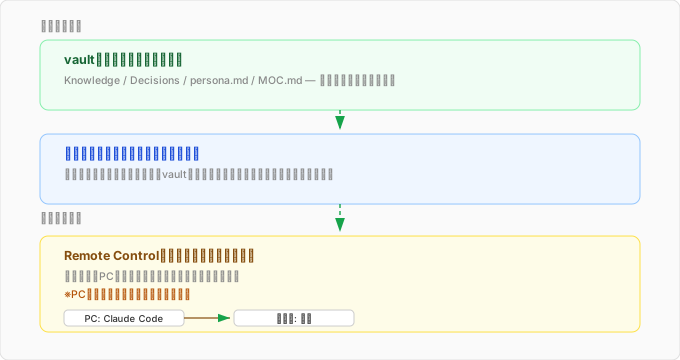
At the top is the hand-curated vault. Second is the raw session log that’s kept in full, uncurated. Third is Remote Control, which makes both of those reachable from the phone too. The top two are memory itself; the third is the access path to it.
My previous post was about keeping the option open to move away from my current AI provider. This one is the opposite — it’s about deepening my dependence on the AI I’m already using. By making it usable from my phone at the same depth as on the PC, my dependence on Claude Code got even stronger.
Still, I think both posts share the same root. They’re both about “not letting the choices you already have stay narrow.” Last time it was about where to go; this time it’s about how to get there. Reducing dependence, and expanding what you can do within that dependence, turned out to be two different axes — something I only noticed by writing this.
I’m glad I didn’t just stop at “probably not possible” and looked a little further.
comments powered by Disqus