How I turned my external brain's search from keyword matching into semantic search
A while back I wrote about turning Obsidian into an external brain for Claude Code. The idea: Claude Code loses its memory across sessions, so I have it read and write a Markdown vault to carry knowledge forward. It’s still running fine.
But the more I used it, the more one weak spot stood out: recall was keyword search, full stop.
Step two of the read procedure I described in that post was “search the vault for keywords related to the question.” That step misses more than I expected. Daily logs, for instance, are named like メモ/2026-06-23.md — the date is the filename — so if I don’t remember when something happened, I can’t find it. “What did I do that one time” is exactly the query I most want to work, and it doesn’t, unless I remember the date. It’s also fragile to word choice. Search for “don’t grant too much permission” and it won’t match a note that says “許可” (permission) and “射程” (scope) instead — even though they’re saying the same thing.
In short: keyword search is precise but leaky. What I actually wanted was search by meaning — embeddings.
The trigger was a comment
Right around then, someone left a comment on the external-brain post saying they were trying TencentDB-Agent-Memory with Hermes Agent — apparently a tool for giving agents long-term memory. I got curious and looked into it.
It was well built. It distills conversations through four layers: L0 raw conversation, L1 extracted facts, L2 scenarios, L3 persona. Storage is local sqlite, embeddings are local too. And crucially, the upper layers are kept as readable Markdown rather than collapsed into an opaque blob of vectors. That “memory you can still read” philosophy is close to what I’m going for with my vault.
The catch: this is a plugin for Hermes Agent and OpenClaw, different agent runtimes. I use Claude Code, and there’s no slot for it there. It probably fits the commenter’s setup perfectly, since he’s on Hermes. It just doesn’t fit mine.
So I decided not to use it. Good tool, wrong fit for my use case — don’t install it. Evaluating something and deciding not to use it is part of the job too. But the exercise clarified two things: the weakness to replace (keyword search) and the feature I actually wanted (semantic search).
All I needed was semantic search
If that’s all I needed, I could just add that one piece myself. No need to bring in an entire framework.
What I built is a small CLI called vault-search. It does this:
- Split the vault’s
.mdfiles into chunks by heading - Embed each chunk locally with Ollama (the bge-m3 model)
- Normalize and store the embeddings in sqlite
- At query time, embed the query too, and pull the nearest chunks by cosine similarity
On its own, that’s semantic-search-only. But semantic search alone tends to surface things that are “sort of related” but actually off-target. Keyword search is precise but leaky. So I run both and merge the results with RRF (Reciprocal Rank Fusion) — add the semantic rank and the keyword rank together, and whatever shows up high in both floats to the top. Hybrid search, in other words.
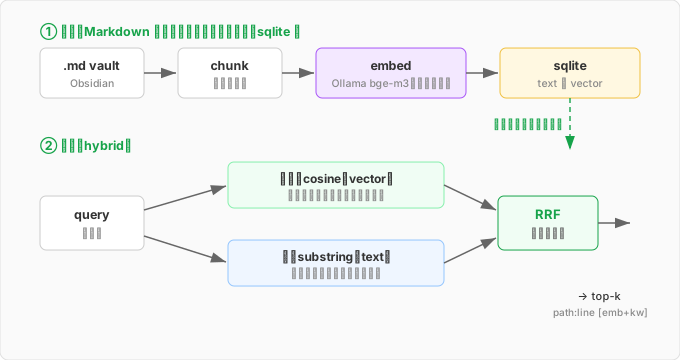
I kept dependencies to just the Python standard library. My local Python is 3.14, which is new enough that the torch-family libraries haven’t shipped wheels for it yet — trying to install them drags you into dependency hell. So it was faster to build this entirely on the standard library plus Ollama’s HTTP API. Even brute-force cosine similarity over the whole vector set, done in plain Python, returns in 75ms for a few thousand chunks. And since embedding happens locally too, none of my notes’ contents ever leave the machine.
Where ripgrep wasn’t
This is where I got stuck the longest. For the keyword side, I figured I’d use ripgrep — it’s fast, and I use it constantly anyway.
But looking at the search results, everything was tagged emb (semantic) and nothing was ever tagged kw (keyword). What was supposed to be hybrid was running as semantic-only.
Digging in, the cause was that ripgrep simply wasn’t being found. Calling it from Python raised FileNotFoundError. But rg worked fine from the shell. Confused, I ran which rg — and what came back wasn’t a path to a binary, it was a shell function definition.
In the Claude Code environment, rg isn’t an actual binary — it’s defined as a shell function that redirects into Claude Code itself. So it works from the shell but is invisible to Python’s subprocess. And to make things worse, my code was written to silently skip the keyword step whenever ripgrep couldn’t be found. I’d been swallowing the error.
I started to fix it by hunting for ripgrep’s absolute path — and then stopped mid-edit.
The chunk text was already sitting in sqlite in full. It’s stored right alongside the embeddings, for exactly this purpose. There was never any need to have an external ripgrep process scan files. Keyword search just needed a plain Python substring match against the text already in the database.
So I dropped the call to ripgrep entirely and did it all inside the DB. One less dependency, and the whole chunk of code that mapped ripgrep’s file-and-line output back onto chunks became unnecessary too. The code actually got shorter.
The dependency I’d added turned out to be dead weight — the data I needed was already right there. That’s the real lesson from this one: before reaching for a convenient tool, check what you’re already holding.
The payoff
The vault is 1,055 files, which comes out to 2,927 chunks. Semantic search now works across all of it.
Search “how did I set up gitleaks” — no date specified anywhere — and メモ/2026-06-23.md, the daily log from the day I actually did that work, comes back first. I don’t need to remember the date; I can find it by what I did. That’s exactly what I wanted.
Search “keep AI from being granted too much access” and it surfaces the source note behind the post about the scope of permissions. That note never uses the words “grant,” “too much,” or “access” — it says “許可” (permission) and “射程” (scope). The wording doesn’t match at all, but it connects on meaning. Keyword search would never have surfaced this one.
Step two of the external-brain procedure has now gone from keyword search to hybrid search. Starting with the next session, Claude Code will dig through the past by meaning before it answers.
Open-sourced it
Once I had it working, it occurred to me that other Obsidian users would probably want this too. So I released it under MIT.
github.com/nobu666/obsidian-vault-search
There are already semantic-search plugins out there — Smart Connections, which you use inside the app’s own GUI, or khoj, which does a lot more. Where this one sits relative to them: a lightweight CLI built on nothing but the standard library and Ollama, meant to feed an agent’s recall. It’s not for a human to browse through a GUI — it’s for something like Claude Code to invoke at the start of a session and pull relevant past notes into context. Under 300 lines, a single script, readable in one pass.
While I was at it, I added tests and CI, and locked down the main branch so it can only be updated through a PR, not a direct push. Even for a repo with exactly one contributor, once it’s public it’s worth holding to a basic standard.
Looking back
I evaluated a heavyweight framework and ended up settling on roughly 250 lines of my own code. The tool from the comment was genuinely good, and looking into it is what made it clear that the one thing I actually needed was semantic search. Deciding a good tool doesn’t fit you is a call you can only make after you’ve actually looked into it. Not wasted effort.
In the external-brain post I wrote that the trick is not over-building from the start. Same story here. Wire up keyword search first, feel where it falls short, then add semantic search. If I’d built the whole thing around embeddings from day one, I probably wouldn’t have noticed the ripgrep problem at all, and would have gone on carrying a dependency I never needed, satisfied that it was fine. You notice more by growing something than by front-loading it.
comments powered by Disqus