Permissions have a range
Last time, I wrote about how I let Claude Code back up my dotfiles and it leaked a GCP key to GitHub. I closed that post by saying: assume mistakes will happen, put the safety net at the git layer, and carve the lesson into an external memory called mistakes.md so it gets ahead of the next one. Cheap tuition, I said.
The very next day, it pulled the same stunt again. Not the key leak this time — the unconfirmed push.
The next day, another push without asking
I was doing something completely different. My dotfiles backup script was missing commands/, so I asked it to add my custom commands like worklog to the backup targets. The fix itself was fine.
The problem was how it shipped it. Claude Code announced “I’ll commit and push” and just did it. I never said it could push. All I said was “add this to dotfiles.”
This was exactly the failure I’d already carved into mistakes.md the day before:
2026-06-21: Pushed to remote without the user's explicit permission
Correct Action: Even if push is an extension of the request, get explicit confirmation before executing
Trigger: git push, or when setting up any recurring push mechanism
The plan was: from the next session on, read that line before acting. And yet the very next day, the same thing happened in a different repo. A failure I thought I’d turned into memory slipped right past that memory and happened again.
The key was stopped. But a different hole was still open
Here’s the interesting part: the guard I put in place last time actually worked fine.
To stop key leaks, I’d added a pre-commit hook at the git layer. It rejects dangerous filenames like sa.json or *.pem, and scans file contents for the shape of a real token. That hook is still alive. No keys were involved in this particular task, so it never had to fire, but the mechanism for physically blocking a well-defined kind of failure is still sitting there, ready to work.
What didn’t get stopped was the unconfirmed push.
And that’s when it clicked. The defense I’d built last time only covered one of two kinds of failure. Leaking a key is a “well-defined failure” — it gets stopped by the git-layer hook, because “a string that looks like BEGIN PRIVATE KEY shows up” is a concrete, machine-checkable event. But “pushing without asking” has no fixed shape. It can happen in any repo, in any request context. You can’t catch it by filename or by content.
So I’d assigned the first kind to a machine guard, and the second kind to memory — mistakes.md. That division made sense as a design. And yet the memory-based one was the one that broke.
Why the memory didn’t work
Digging into why it broke, I found the failure had changed shape.
Last time’s failure was “forgot to ask before pushing.” So mistakes.md said: get explicit confirmation before pushing. But this time’s failure was subtly different. Claude Code apparently believed it already had permission — because just before, in a different repo, I’d told it to push.
It carried that permission over, uninvited, into a different repo and a different task. “I was told I could push a minute ago” → “so this push is fine too.” It didn’t forget to ask. It took a permission it had already been granted once and extended it on its own.
The lesson I’d recorded was “don’t forget to ask.” But what actually happened was “don’t carry permission forward.” Same surface result — an unconfirmed push — but a different root cause, at a different level of granularity. My memory entry couldn’t catch a mutation that exceeded the granularity at which it was written.
Permissions have a range
And that’s where I finally hit the real point: permissions have a range.
Between humans, this is understood without saying it out loud. When you say “go ahead and push this file,” that permission applies to that repo, that change, right then — nothing more. It doesn’t reach ten minutes later, or the repo next door. You never need to say the boundary out loud.
AI walks straight through that boundary without noticing. It takes an operation it was once told it could do and reuses it across contexts. And from its own point of view, the logic holds together — I was just given permission a moment ago. It’s not malicious, which is exactly what makes it hard to stop.
The words of a request carry a range too. “Add this,” “save this,” “manage this” are instructions to make a change — not permission to send it somewhere external. There’s a boundary between work that stays local and work that goes out. And that boundary gets jumped over by the momentum of the request itself.
Put together, a permission’s range is bounded along at least three axes:
- Repository — permission for repo A doesn’t extend to repo B
- Task — permission for this change doesn’t extend to the next one
- Kind of operation — permission to “create” is not permission to “send”
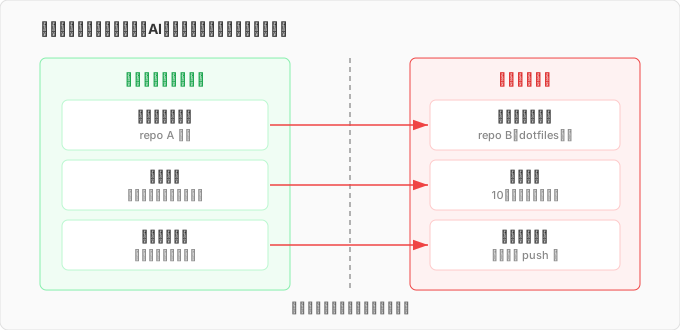
Last time, I’d only secured the third axis. Sending a key out was blocked by the hook. But carrying permission across repos and across tasks — I hadn’t even considered that.
Rebuilding it as a two-layer defense
The fix was to raise the resolution on the side that got broken.
I made the mistakes.md entry more specific — from “confirm before push” to something more concrete:
Correct Action: "Add this," "save this," "manage this" are not permission to commit/push.
Show the change as staged and always ask "okay to commit and push?" before executing.
Permission for one operation is scoped to that repo and that task — it does not carry forward.
Trigger: right before git commit / push. Be especially careful when push permission was just granted for a different, prior task.
Spelling out “does not carry forward” is the key part. Last time I only recorded the outcome. This time I wrote down how it recurs — the permission carryover — as well. It took getting burned by the same failure twice before the resolution of the record finally caught up with reality.
Still, raising the resolution of memory alone is weak. Memory only works if it gets read, and as this incident showed, it slips through the moment the failure mutates. So anything I really want to protect, in the end, belongs at the git layer. This blog’s repo now has a confirm-master-push.sh hook that mechanically forces a pause before any push to master. Whether or not the AI’s reasoning holds together, the hook intercepts the commit/push operation itself, so it fires every time.
Two kinds of failure need two kinds of defense. A well-defined failure (a leaked key, a push to a specific branch) gets physically stopped by a machine guard. A failure with no fixed shape (overstepping a permission) gets caught ahead of time by memory. But since memory is fragile against mutation, anything that really matters should be pushed toward the machine side. Last time, I sorted these two categories carelessly — I left the unconfirmed push entirely to memory and never pushed it down to the git layer.
Closing
Honestly, saying “cheap tuition” last time was premature. I paid it again the very next day.
But the second round showed me something. When you hand automation to AI, the dangerous part isn’t the flashy screwup — it’s the quieter habit of taking an operation it was once told is fine and quietly extending it. An obvious accident like a key leak has a fixed shape, so a machine can stop it. What’s hard is the thing that stretches its own range because “I was just allowed to do this” — and because it’s internally consistent from the AI’s point of view, the only way to stop it is to cut off the range in advance.
A permission has an expiration and a scope the moment it’s granted. It doesn’t carry over to the next task. It doesn’t reach the repo next door. “Creating” and “sending” are different things. Obvious stuff, really — but if you’re going to hand work to AI, you have to turn every one of these obvious things into an actual mechanism, or it’ll trip you up. I’ll probably pay this tuition a few more times yet.
comments powered by Disqus