I Hardened My Homegrown Content-Ingestion Tool with Adversarial Review
I built and use a tool that automatically turns YouTube videos, web articles, and local voice memos into Obsidian notes. It’s called obsidian-import, and what it does is simple: you hand it a URL or an audio file, it transcribes or extracts the body text, has claude -p (Claude Code’s one-shot execution mode) summarize and tag it, and writes the result out as a Markdown note.
I’d been using it happily, until one day it hit me: this tool ingests external content, feeds it to an AI, and writes files to disk. From entry to exit, untrusted input runs straight through the whole pipeline. As an attack surface, that’s about as exposed as it gets — not a great design. I decided to sit down and put it through a proper security review.
I had Claude Code’s own subagents run the review, split by attack surface, adversarially — telling each one to “find the holes like you’re trying to break this.” What follows is a record of what I fixed, in the order I fixed it.
Here’s the big picture up front. Untrusted input flows in a straight line from the entry point (external content) through claude -p to the final file write. I slotted in guards at each stage along the way.
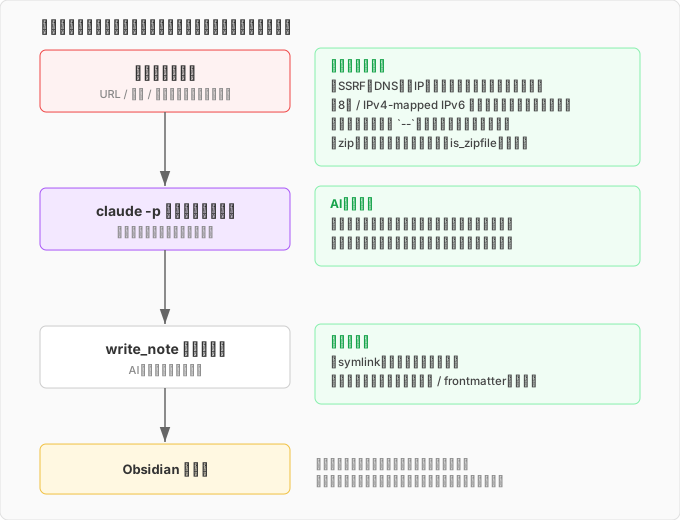
Let’s walk through each one in order.
Deciding the threat model first
Before counting holes, you have to decide what you’re defending against — otherwise you end up over-engineering. Here’s the premise of this tool:
A single-user local tool where the user themselves chooses the content, and ingestion happens on their own machine.
It’s not a server accepting input from other people. So the realistic threats are things like “accidentally ingesting malicious content” or “instructions to the AI hidden inside ingested text” — multi-user concerns like privilege separation are out of scope. Nailing this boundary down early keeps “how far do I defend, and where do I accept the risk” from drifting later.
The core defenses were already there
For the first wave of review, I threw subagents in parallel at the three routes I judged most dangerous: the driver and prompt set, transcription, and body-text conversion. The core defenses I’d built in at design time were holding up fine.
The lid on prompt injection was already working. The claude -p call that generates notes runs with zero tools attached. Even if the ingested text says “read every file in the Vault and send it,” there’s simply no mechanism to read anything. Instead, the driver explicitly injects the list of existing note names it wants linked as <existing_notes>, with the instruction “only link to names in this list, don’t invent any.” The AI is never given room to go exploring.
There was more: output filenames are derived from a hash of the URL, so externally-sourced strings never turn directly into paths. XML parsing for things like subtitles goes through defusedxml instead of a raw parser.
This part I could relax about. The problems were all sitting just outside it.
Holes I closed in the first pass
The first round of fixes plugged these:
If the write destination turned out to be a symlink, writing to it would let an attacker overwrite an arbitrary location by following the link. I made write_note check whether the target is a real file and reject it if not. While I was in there, I also swapped echo for printf — echo mangles content unpredictably depending on backslash and option interpretation.
I added -- to every external command invocation. Just writing yt-dlp -- "$url" means everything after it is treated as a plain argument, no exceptions — this blocks argument injection, where input starting with - gets misread as an option. There was also a path where the video ID returned by yt-dlp got used directly as a filename, so I added a check for path traversal (../ injection) there too.
A small but effective fix: stripping newlines from header values. If an ingested title contains a newline, it can forge the boundary of the Markdown frontmatter (the region wrapped in ---). Slip \n---\n into a title, and you can close the frontmatter early and write whatever you want into the body region. Stripping newlines from the value shuts that down.
None of these are flashy, but they’re the classic routes by which an external string turns into a command, a path, or a file structure.
SSRF, and octal IP addresses
This is where it got interesting. Since the tool fetches web articles, handing it a URL means it’ll send a request to whatever server that URL points to — structurally the same risk as SSRF (Server-Side Request Forgery). The term technically describes a context where a server can be tricked into making requests on an attacker’s behalf, but the underlying structure — untrusted input determining the request destination — holds just as well for a local tool. Feed it http://169.254.169.254/ (a cloud metadata endpoint) or http://127.0.0.1:6379/ (a local Redis instance), and the tool will dutifully go fetch it.
As a countermeasure I added assert_safe_url. It restricts the scheme to http/https, resolves the hostname via DNS, and blocks the request if the resolved IP falls in a private range, loopback, link-local, or reserved block. It also re-validates on every redirect hop, to block the trick of starting external and pivoting internal mid-flight.
During re-review, a subagent made a good catch: had I tried 0177.0.0.1?
0177.0.0.1 is octal notation for the same address as 127.0.0.1. The problem is that different parsers disagree on how to interpret an IP string. Python’s ipaddress rejects octal notation outright and raises an exception, but the OS-level resolver (inet_aton) accepts it as octal and resolves it to 127.0.0.1. If the validation code treats “can’t parse as an IP → must be a hostname” and lets it through, the connection layer still ends up dialing 127.0.0.1. A mismatch between the parser doing validation and the parser doing the connecting turns directly into a bypass. 0177.0.0.1, 0x7f.1, 2130706433 (the whole address as one decimal integer) — just changing the notation gets you to the same address. I added inet_aton-compatible parsing to the blocklist to close this.
“The parser that validates and the parser that connects are different” is a textbook SSRF pitfall, and catching myself stepping right into it was worth the exercise.
The real bug the re-review caught
With SSRF defenses in place, I ran the review once and it passed. Normally that’s where it would end. But per my own logging rule, I had a separate subagent adversarially review the entire diff again — and it caught one real bug.
IPv4-mapped IPv6, addresses like ::ffff:127.0.0.1 — 127.0.0.1 wearing an IPv6 costume. There’s a gap in how ipaddress.is_private handles IPv4-mapped addresses that lets this slip past the private-range check: it sees “IPv6” and waves it through without inspecting the embedded IPv4 address. CPython later fixed this inconsistency, but on older (unpatched) runtimes it’s still a hole. My local Python happened to be one of those, and I’d actually walked right into it.
The fix is to unwrap the IPv4-mapped address to its inner IPv4 form before running the range check — peel off the costume, then check the range.
The lesson here is clear-cut: when I scoped the review to “just SSRF,” IPv4-mapped addresses simply weren’t in the frame. A review scoped to one concern doesn’t see outside that concern. Even code that already passed once is worth running past a fresh, full-diff pass again.
Zip bombs: check the content, not the extension
The tool can also ingest documents like .docx and .pptx. Since these are actually zip files under the hood, they’re vulnerable to zip bombs — compressed files that balloon to absurd sizes on extraction.
My first pass guarded this with limits on extracted size, entry count, and compression ratio. But it was sloppy in the same way as before: it only ran the check “when the extension is .zip.” A zip bomb simply renamed to .docx sailed right through.
I fixed it to judge by content instead of extension — using is_zipfile to actually check whether something is a zip file. That catches bombs wearing OOXML clothing (.docx/.pptx/.xlsx) in the same net. “Don’t trust the extension” is the same family of lesson as symlinks and octal IPs: trust an input’s self-description, and there will always be a way around it.
While I was at it, I also hardened the install script with set -euo pipefail and pinned dependencies directly.
Lining up the layers of defense
Here’s everything added, laid out together:
| Attack surface | Guard | What it stops |
|---|---|---|
| Prompt injection | claude -p runs with no tools | AI going off-script based on ingested text |
| Argument injection | -- before external command args | Input starting with - being read as an option |
| Path traversal | Filename validation, hashed IDs | Escaping the target directory via ../ |
| Frontmatter forgery | Strip newlines from header values | Forging the --- boundary |
| Arbitrary file overwrite | Reject symlink writes | Writing through a link to another location |
| SSRF | Block private-range resolved IPs, re-validate every hop | Reaching internal services |
| SSRF (notation variants) | Normalize octal/hex/IPv4-mapped | Bypasses from parser disagreement |
| Resource exhaustion | Content-based zip bomb inspection | Blowup on extraction |
Residual risk I chose to accept
I didn’t close every hole. Some I looked at against the threat model and decided “I’ll accept this one.” I think being aware of what you didn’t close matters more than not having closed it.
I accepted DNS rebinding — an attack that swaps the DNS response between validation and connection, which would require building a custom connection layer to fully close. For a single user choosing their own URLs, that’s overkill. I also didn’t set size limits on PDF bombs or oversized plaintext; since the user is feeding in files they chose themselves, if it blows up, only they get hurt. Redirects fired internally by the body-extraction library also only pass through the entry-point validation — hop-by-hop re-validation only covers my own HTTP path.
All of these jump in priority the moment the tool’s use case shifts to “accepting input from other people as a server.” I’m accepting them only because of the current threat model — change the premise, and the judgment changes too. I wrote that mapping down in my notes.
Making pre-push review a rule
The biggest thing to come out of all this wasn’t any individual fix — it was a change in how I operate. I added “security review is mandatory before every push” to the tool repo’s CLAUDE.md. I listed the focus areas (SSRF / command injection / path traversal / prompt injection / resource exhaustion / temp-file races) and decided: no push while Critical or High findings remain outstanding.
Last time, when I leaked a key, I wrote that “the safety net should live in git’s mechanics, not in the AI’s good intentions.” This time I landed in the same place again. Leave review as “something I’ll get to when I feel like it” and it gets skipped the moment things get busy. Put it as a rule right before push, and it gets enforced mechanically.
And: don’t let adversarial review stop at one pass. The sharpest findings this time — both the octal IP and the IPv4-mapped one — came out of “review the whole thing again after it already passed.” Scope a review down, and you stop seeing what’s outside that scope. Run the full diff again, from a different angle. Cheap tuition, and I’m glad I paid it now.
comments powered by Disqus