Giving Amnesiac Claude Code an External Brain with Obsidian
The most wasteful thing about using Claude Code, in my opinion, is that it loses all its memory the moment a session ends. Whatever tripped it up last time, whatever preferences I mentioned, whatever assumptions the project runs on — the second I start a new conversation, I’m explaining everything from scratch again. It’s brilliant, but it feels like calling a call center where you’re a stranger every single time.
I saw a video describing a way to fix this by turning Obsidian into external memory. It looked interesting enough that I set it up for my own environment. I was skeptical going in, but it’s working better than I expected. In fact, the very Claude Code session writing this post read through Obsidian before writing a word of it.
What I wanted
Claude Code does have an official memory feature, but it has a few things I don’t like about it.
- I can’t see what it actually remembers
- The AI decides what’s worth remembering — I don’t get to set the rules
- It’s locked inside Claude, with no way to take it anywhere else
- Everything gets mixed into one memory, with no way to separate it by project
What I wanted was the opposite of all that: memory I can fully inspect, rules I get to define myself, plain Markdown so it’s portable to anywhere, and folders so I can partition it by domain. An Obsidian vault is just a pile of local text files, so it checks every one of those boxes.
How it works
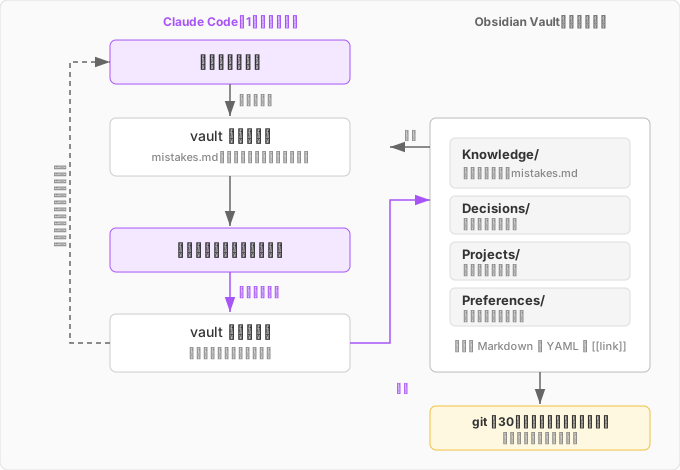
Nothing fancy here — just an Obsidian vault folder and a single Claude Code config file. The config file spells out the rules for talking to the vault. Broadly, there are two jobs: reading and writing.
Reading (at the start of a session)
At the start of every new conversation, it’s required to go check the vault first.
- Read
mistakes.md(more on this below) — a running log of past corrections — and the user profile, before anything else - Search the vault using keywords relevant to the question
- Read whatever notes come up
- Answer with that context in hand
This gets rid of the “explain all the context again” problem entirely. There’s one exception built in: obviously unrelated one-off questions (something like “what time is it?”) can skip this step.
Writing (recorded on the spot)
“I’ll write it up later” doesn’t work. Whenever something meets the criteria mid-conversation, it has to get written down right then. Where it goes depends on the folder.
| Folder | What goes there |
|---|---|
Knowledge/ | Root causes and fixes for bugs, newly discovered tools, anything that was a struggle and got resolved |
Decisions/ | A choice made among multiple options, along with the reasoning |
Projects/ | Changes in a project’s state, version, or overview |
Preferences/ | Newly learned user preferences or working style |
Every note gets YAML frontmatter (date, tags, project, related notes), and related notes get linked with [[wiki links]]. That way, Obsidian’s graph view eventually shows how all the knowledge connects.
No working in silence
One small but essential rule: every read or write has to be reported back to me. “Obsidian: read Knowledge/xxx.md,” “wrote to it” — every time, spelled out. If files were getting touched behind my back, I’d have no idea what was actually accumulating, so transparency was a requirement from day one.
mistakes.md: not making the same mistake twice
My favorite part of this setup is Knowledge/mistakes.md, a log of mistakes. It gets special treatment — the read rule above requires it to be read at the start of every single session, no exceptions. Whenever I catch a mistake mid-session, it gets written down here as a rule.
But if I let it log anything and everything, the table would balloon into something unusable. So I narrowed it down to three conditions for adding an entry.
- It’s an explicit correction from me (not something it noticed on its own)
- It’s a pattern likely to recur (not a one-off fluke)
- It can be phrased as a concrete “do this / don’t do this”
The format is fixed too. Here’s one actual entry sitting in the log right now:
2026-06-20: Stated an app's UI feature from vague memory without checking
NG Action: Told the user Google Calendar has a "copy to" button, without verifying (it doesn't exist)
Correct Action: Before describing whether a feature exists, check the current spec via official help docs etc.
Trigger: When explaining how to operate a specific app or whether it has a certain feature
Since adding this, the frequency of repeating the same kind of mistake has dropped noticeably. A correction now carries over into the next session, so I don’t have to nag about the same thing over and over. It’s a small thing, but it might be the single biggest stress reduction from this whole setup.
And it doesn’t just sit there accumulating, either. While I was in the middle of a completely different task, Claude declared, unprompted, “Per the lesson in mistakes.md, I’ll write multi-line scripts to a file first” — and changed its own approach on the spot. That was a preemptive dodge of something I’d only scolded it for once before: breaking output with nested heredocs. The accumulated memory was actively changing its next move. At that point it stops feeling like external memory and starts feeling more like a colleague who learns from past failures.
What’s actually piled up so far
After just a few days of use, the vault already has notes like these. All of them were written automatically, in the middle of working with Claude Code.
Knowledge/obsidian-launchd-backup-tcc.md— a writeup of why the vault’s automatic backup wasn’t working under macOS TCC (privacy protection). Root cause: processes launched from cron or launchd don’t inherit permission for anything under~/Documents. Fixed by adding/bin/bashand/usr/bin/git— not the script itself — to Full Disk Access. The whole story is preserved as-is.Knowledge/timetree-google-sync.md— technical notes on syncing TimeTree events to Google Calendar: from the fact that the official API has been shut down, down to the key detail thatevents.importworks as an upsert keyed oniCalUIDDecisions/2026-06-20-timetree-sync-approach.md— the reasoning behind which of several approaches got picked for that sync
The TCC note in particular will be genuinely useful the next time I run into that exact symptom. Something I struggled through once and solved can now live in the vault instead of relying on me remembering it.
Backing up the memory itself
The bigger this external brain grows, the scarier it gets to lose it. So I set the vault itself to auto-commit and push to git every 30 minutes. While building that, I ran into the same TCC issue — which is exactly how obsidian-launchd-backup-tcc.md above came to exist. Building the memory system generated one more piece of memory along the way.
This very post is an example
The clearest example of all is this post itself. All I asked was “write about how you turned Obsidian into a knowledge base for Claude Code,” and Claude Code started by reading mistakes.md and the profile, searched the vault for relevant keywords, pulled up the note about the source video and the TCC knowledge note, and only then started writing. It reported every single thing it read along the way.
The read rules I set up ended up doubling as material-gathering for the post itself. External memory isn’t just for carrying context forward — it turns out to work as a primary source when writing, too.
Looking back
Laid out plainly, none of this is a big deal. I made a few Markdown folders and wrote some read/write rules into a config file. No MCP, no plugins required.
And yet an AI that used to explain everything from zero every time turned into a partner that can pick up where we left off. I think the trick is not over-engineering it up front. Connect it, run it, and keep adding small rules — “remember this,” “check the vault at session start” — and it gets a little smarter each time, almost like synapses forming. That “growing a brain” feeling is something I picked up from the video, but having actually done it, it’s real.
comments powered by Disqus