I open-sourced my YouTube-to-Obsidian converter and turned it into a general-purpose tool
Last time, I built a pipeline that automatically converts YouTube cooking videos into Obsidian recipe notes. It was just two scripts dropped straight into ~/scripts/, but it got me through 43 cooking videos. Since then I worked with Claude Code on a code review, added tests, set up CI, published it on GitHub, and eventually rebuilt it from a recipe-only tool into a general-purpose one. Here’s how that went.
Code review and fixes
First I had Claude Code review the existing scripts. The main issues it flagged:
- The transcript file write wasn’t atomic (a crash mid-write would leave a corrupted file behind)
- Error handling was sloppy (the script could exit cleanly even if everything failed)
- The mlx-whisper import check was slow
I fixed the atomic write with the standard pattern: write to a temp file via tempfile.mkstemp, then rename it into place. I also fixed the exit codes for error cases.
Tests and CI
I mocked out the external dependencies (yt-dlp, mlx-whisper, the filesystem) and wrote 25 tests. It runs on pytest + GitHub Actions. Since mlx-whisper is Apple Silicon only, I don’t install it in CI — the whole thing is verified through mocks instead.
One thing that quietly tripped me up: my mock transcripts were too short and kept getting flagged by the hallucination detector. I had the mock returning a short string like “こんにちは” (“hello”), and anything under 50 characters gets automatically treated as a hallucination.
Dealing with Whisper hallucinations
Once I actually ran all 43 videos through it, a few of them triggered Whisper’s classic “hallucination” failure mode — the same phrase repeated endlessly. It tends to happen during silence or ambient-noise-only stretches.
To guard against it, I added an is_hallucinated() function that checks three things:
- Text under 50 characters (too short)
- A regex pattern matching the same phrase repeated 5+ times in a row
- Punctuation/symbol ratio over 80% (no actual content)
Operational tweaks
A handful of small changes that made a real difference once I started actually using this day to day.
- Process one video at a time — I originally fed all the transcripts to the Claude CLI in one batch, but it would just stall out. Switched to a loop that handles one file at a time: on success it moves the file to a
donedirectory, on failure it stays put so it can be retried - Make Ctrl-C actually stop it — once it was a loop, hitting Ctrl-C would just skip to the next file instead of stopping. Added a
trap INTto catch the signal and exit immediately - Keep the Mac from overheating — running Whisper and the Claude CLI at the same time spins the fans up nonstop. I lowered the priority with
nice -n 10and usedcaffeinate -ito prevent sleep - Play nice with Obsidian — a folder named
_transcripts/was showing up in Obsidian’s file explorer. Renamed it to.transcripts/so the dot-prefix hides it
Publishing on GitHub
I pushed the whole thing to GitHub as youtube-to-obsidian. ~/scripts/ now just holds a symlink into the repo. I also wrote an install script so setup is a single curl command.
curl -fsSL https://raw.githubusercontent.com/nobu666/youtube-to-obsidian/main/install.sh | bashIt can also be registered as a Claude Code skill (global command), so I can invoke it with /youtube-to-obsidian from any project.
From recipe-only to general-purpose
At the point I published it, the command was still called recipe and the prompt was hardcoded for cooking videos. But the transcription part is completely generic — swap out the conversion prompt and it works for anything, not just recipes. So I generalized it.
Switching command names and prompts
Renamed the command from recipe to youtube-to-obsidian. Also cleaned up variable names to be generic, e.g. RECIPE_DIR → OUTPUT_DIR.
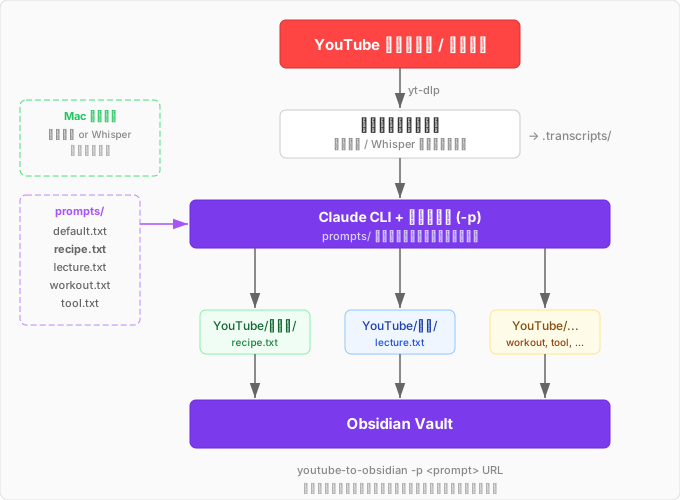
Prompts now live as separate files under a prompts/ directory, selectable with a -p flag.
# Default (general-purpose note format)
youtube-to-obsidian https://www.youtube.com/watch?v=XXXXX

# Recipe
youtube-to-obsidian -p recipe https://www.youtube.com/watch?v=XXXXX

# Lecture notes
youtube-to-obsidian -p lecture https://www.youtube.com/playlist?list=XXXXX
I ended up with five prompt types.
| Prompt | Use case | Example output |
|---|---|---|
default | General purpose (structured notes) | Summary + sectioned content |
recipe | Cooking video → recipe | Ingredient list + steps |
lecture | Lecture/seminar → summary notes | Overview + key points + detailed notes |
workout | Strength training/yoga → workout plan | Exercise table + form notes |
tool | Tool walkthrough → how-to guide | Setup + usage + tips |
Routing output per prompt
I didn’t want recipes, lecture notes, and workout plans all dumped into the same folder, so I made it possible to specify the output destination right in the prompt file’s header.
output_dir: ~/Documents/Obsidian/Vault/YouTube/レシピ
---
上の文字起こしをObsidianレシピ形式に変換して...
The output_dir: header sets the destination, and everything after the --- is the prompt body that gets passed to Claude. The target folder is created automatically if it doesn’t exist, and a -o flag lets you override it for a one-off run.
The overall structure
In the previous post this was a simple linear pipeline. With prompt switching and output routing added, it now looks like this.
Going fast by preferring subtitles
Once I generalized it, I tried it on a lecture video and hit a wall. Whisper transcription was way too slow — over 10 minutes for a 20-minute video. That was borderline tolerable for 5-10 minute cooking videos, but useless for an hour-long lecture.
The fix was simple: fetch YouTube’s subtitles first. Most Japanese-language videos have either manual or auto-generated captions available. When subtitles exist, fetching them takes seconds, and Whisper barely gets invoked anymore.
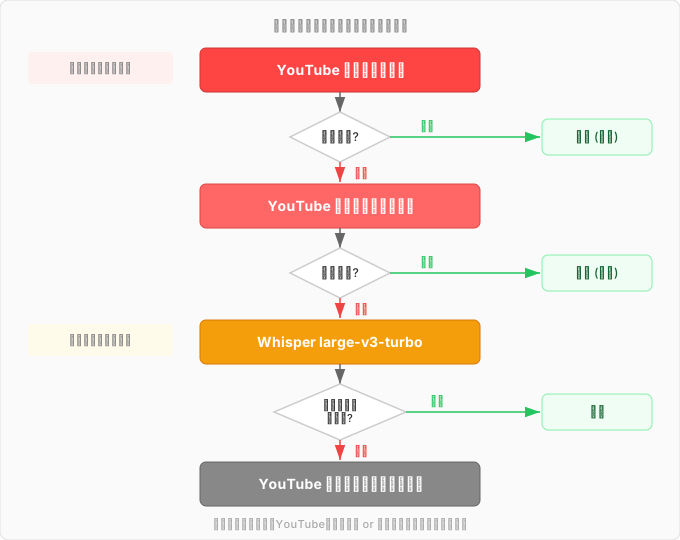
I also switched the Whisper model from large-v3 to large-v3-turbo. In the previous post I wrote about upgrading from medium to large-v3 for accuracy, but large-v3 is slow. large-v3-turbo keeps nearly the same accuracy while running much faster. With subtitles now preferred, Whisper rarely even runs — but it’s still nice to have a fast fallback.
Trying it out for real
I tested it on three kinds of videos.
Tool walkthrough (obsidian-skills) — subtitles fetched, transcript done in seconds. Came out as a clean note with setup steps, usage, and tips clearly separated.
Workout video (ab superset routine) — subtitles fetched. Output was an exercise table plus form notes. It even picked up practical warnings like “never bend your knees — it kills the effectiveness.”
Lecture (Takafumi Horie’s 1-hour talk at Takushoku University) — subtitles fetched, transcription was fast, but structuring it via the Claude CLI took 2-3 minutes. Output was organized into an overview, key points, detailed notes, and quotes — a full hour-long talk cleanly organized. If it had started from a Whisper transcription instead, it would have taken over 30 minutes, so this is exactly the kind of long-form video where preferring subtitles pays off the most.
Looking back
What was a recipe-only script dumped in ~/scripts/ when I wrote the last post is now a published, general-purpose tool on GitHub. Review, tests, CI, renaming the command, building a prompt system, preferring subtitles, switching models — all of it happened through conversations with Claude Code.
The subtitle-first change in particular is something I never would have noticed without actually trying a lecture video. As long as I was only using it for cooking videos, Whisper’s speed was never a problem — it took broadening the use case to even see the bottleneck. “Generalize it, discover a new problem, solve that, and it gets even better” might be one of the most fun parts of building things.
youtube-to-obsidian — works on any Apple Silicon Mac with Claude Code installed. Add your own prompt and it’ll turn any video into an Obsidian note, so feel free to customize it for your own use case.
comments powered by Disqus